

A Mac recorder you can trust with the meeting.
Capture the screen, system audio and your microphone, and see every source confirmed while you record.
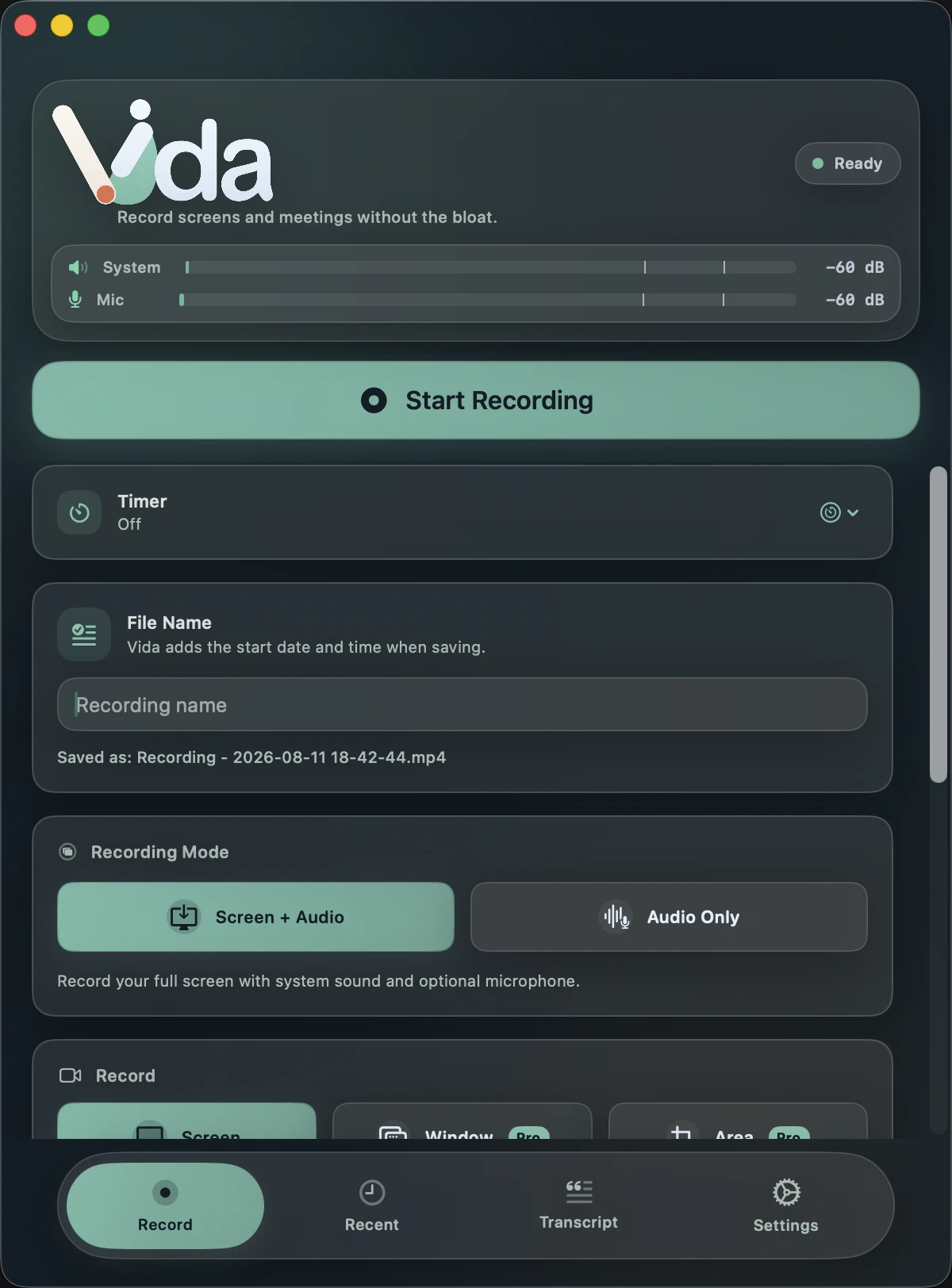
Two modes, one Record button.
Screen and Audio captures the full display with system audio and microphone. Audio Only skips the video when a conversation is all you need.
Every source, confirmed.
The REC health badge reports each selected source on its own, so a silent microphone never hides behind a working screen.
- Video
- Screen frames are reaching the recording.
- Speaker
- Computer audio, including the other participants, is reaching the recording.
- Mic
- Your microphone is reaching the recording.
Recording Waiting Not recording
Green is confirmed. Orange is waiting for the first samples. Red means that source is not being recorded.
Controls for real meetings.
- Countdown
- A short preparation countdown before recording starts.
- Automatic stop
- Set a timer when the session has a known length. It waits while you are paused.
- True pause
- Paused time is cut from the file, so there is nothing to edit out later.
- Floating controller
- Pause and stop from a small panel that is excluded from the capture.
- Menu bar indicator
- Gray when idle, green while recording.
- Keep working
- Browse your history and settings while a recording runs.


Formats and quality
Formats
MP4
Screen recordings, widely compatible
MOV
Screen recordings for Apple workflows
M4A
Compact audio (AAC)
WAV
Uncompressed audio (Linear PCM)
Video quality presets
Small size
0.8 Mbps HEVC, 64 kbps audio
Medium size
3 Mbps HEVC, 96 kbps audio
BalancedVida Pro
8 Mbps H.264, 128 kbps audio
High QualityVida Pro
20 Mbps H.264 or HEVC, 256 kbps audio
Encoding uses the Mac's hardware video encoders through VideoToolbox.
Built so the file survives.
Disk protection
Vida watches free space and helps you avoid a recording that cannot be finished.
Eligible recovery
Interrupted recordings are detected at launch and recovered when the data allows it.
Smart microphone switching
Vida follows the microphone you selected when headsets and docks come and go.
More with Vida Pro
Window or area
Record one application window or a region you draw instead of the whole display.
Camera overlay
Add your camera to a Screen and Audio recording.
Higher quality
Balanced and High Quality presets for tutorials and archives.
Record the meeting. See that it's working. Keep it private.
Requires macOS 14 Sonoma or later. Apple Silicon recommended for transcription.